
Stretched image
Narrowband palette tool
False colours for a dual-band stack (Hα and OIII): eight palettes, among them SHO, HOO and Foraxx, chosen on a contact sheet.
How to use it
- Add the tool from Tools, on a stretched image. Its place is on the nebula layer, after Separate stars: the stars then keep their own colours.
- Press Contact sheet: the eight palettes are shown on the image, side by side. Click one: nine variations follow, with less or more OIII and redder or yellower warm tones, in finer steps at each click.
- Click the middle one to keep it and close the sheet, then press Apply.
Whole image / Detail: the thumbnails show the whole frame, or the part of the image where Hα and OIII are both strong, where the palettes differ the most.
Settings
- Contact sheet
- All the palettes on the image, side by side; then variations around the one chosen.
- Palette
- Gold and blue (default), SHO, Foraxx, Copper and teal, HOO, Natural, Foraxx HOO, HOS (CFHT). The two Foraxx palettes are dynamic: their blends follow the lines themselves.
- OIII
- How bright OIII is next to Hα. In the middle, both are at the same level; to the right OIII is up to four times brighter, to the left up to four times fainter.
- Warm tones
- Turns the warm colours (gold, orange, red) by up to 40°: to the right towards yellow, to the left towards red. Blues and teals do not move.
- Sulfur
- Palettes with sulfur only: how much sulfur is made, as a share of Hα.
- Sulfur away from OIII
- How much less sulfur there is where OIII dominates. At 0, the sulfur follows Hα everywhere.
- Amount
- The palette blended with the image as it was: 100 % is the palette alone.
When to use it
On a stack taken through a dual-band filter, such as the LP filter of a Seestar. Such a filter records no SII: the palettes that use sulfur make one from Hα, stronger where there is less OIII. It is a rendering, not a measurement.
Image
Works only on a stretched image.
Examples
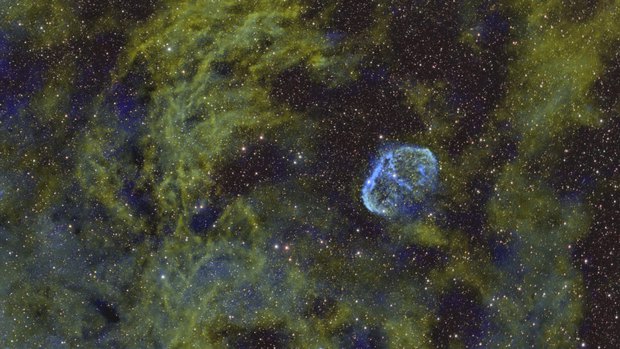
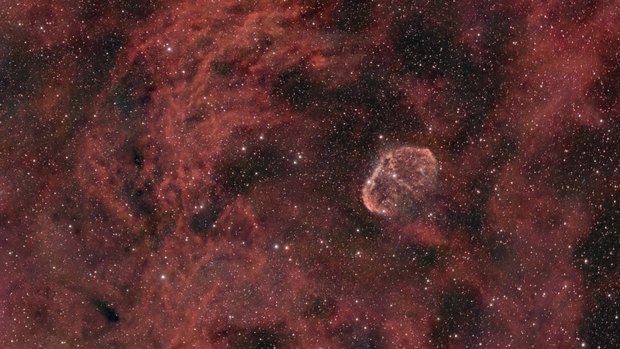 withoutSHO palette
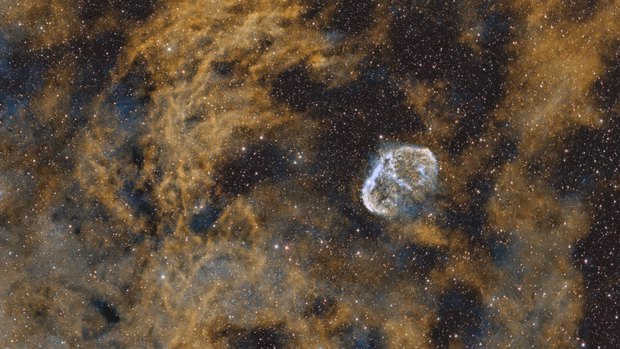 withoutGold and blue palette